How to Make a Hotel Lobby AI Video from Two Photos
Make a 10-second Hotel Lobby AI duet from two photos. Steps, price (720p US$9.90), photo checklist, and FAQ. Portrait 9:16 or Landscape 16:9.
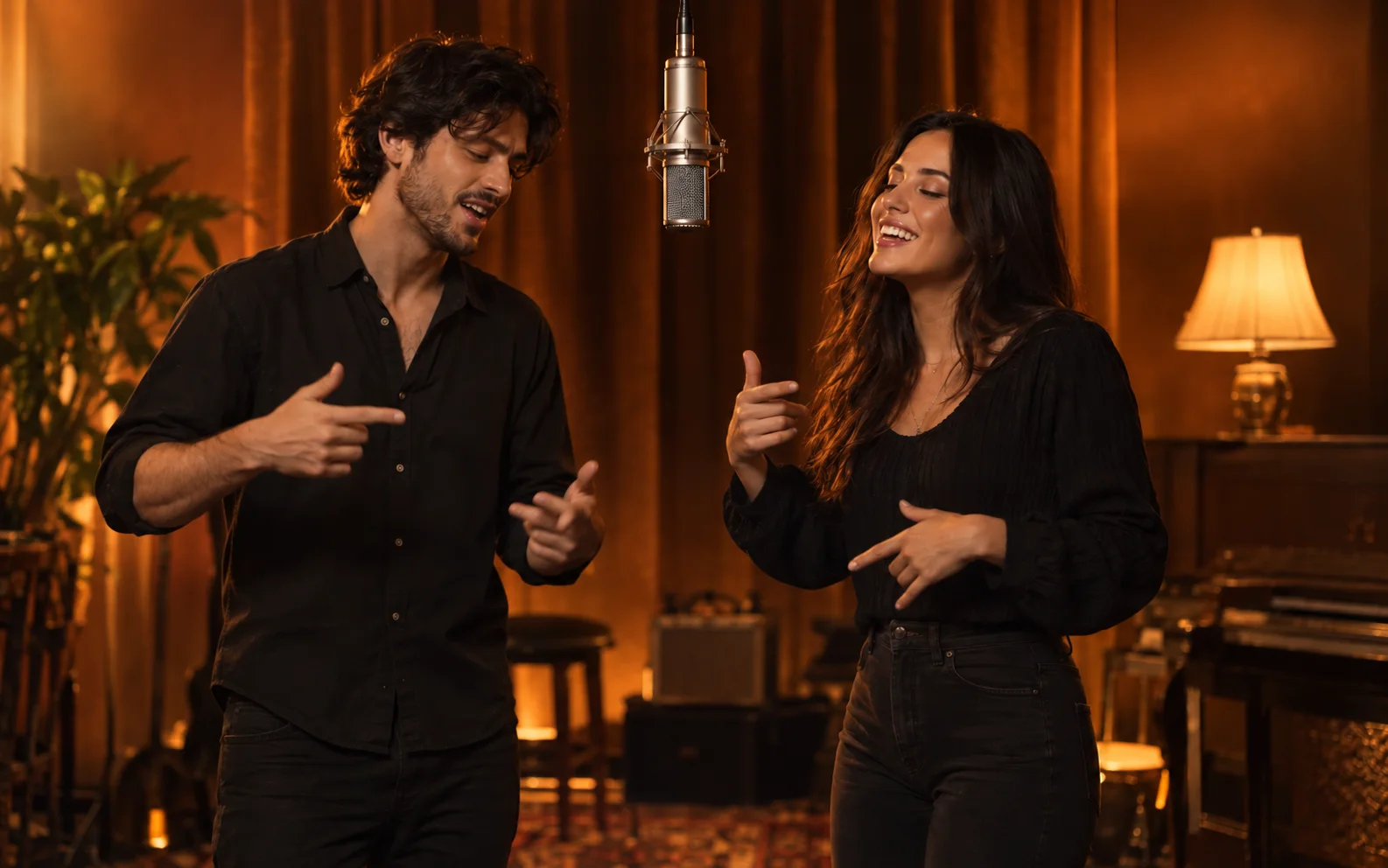
Short answer: A Hotel Lobby AI video puts two new faces into the orange-booth duet inspired by Quavo and Takeoff’s A COLORS SHOW performance of “Hotel Lobby (Unc & Phew).” On KickClap you add two photos (one consenting adult each), choose Portrait 9:16 or Landscape 16:9, and get a 10-second 720p video for US$9.90 — one payment per video. There is no hotel in the scene; “Hotel Lobby” is the track name.
This is the full how-to. KickClap already has three shorter companion posts: the first-time walkthrough, the photo checklist, and the duet style guide. Use those for detail; use this page to go from two photos to a finished clip.
What you need
- Two separate photos, one clear front-facing adult in each
- Consent from both adults to use their photos for an AI video
- An email you can verify (delivery and My videos use that address)
- One payment of US$9.90
You do not need a CapCut template, a written prompt, or an editing timeline. The scene is fixed; you supply the faces.
How to make it
Steps match the Hotel Lobby maker. For a shorter first-run walkthrough, see Create your first Hotel Lobby video.
- Open the maker at kickclap.com/meme/hotel-lobby-ai-trend. You can choose photos without an account first; verify the delivery email before you pay.
- Add two photos. Wait until both finish checking. Use Swap photos if you need to change who stands on the left.
- Choose settings: 10-second video · Portrait 9:16 or Landscape 16:9 · 720p US$9.90 · one payment per video. Your source photos do not need to match the output shape.
- Confirm consent, verify email, and pay once. Generation starts after payment is confirmed.
- Download from My videos with the same email. A completed job has a player and an MP4 download. Download within 7 days after it is ready; after that the file may be deleted. You can close the tab once a paid job has started; a notice goes to your verified email when the video is ready.
Photo checklist (summary)
Full file rules live on Choose photos for your Hotel Lobby video. The short version:
- One person per photo — eyes, nose, and mouth visible. Avoid sunglasses, hands on the face, or a second face in the background.
- Include the upper body — head, shoulders, and torso beat a tight crop or a tiny face in a group shot.
- Even light — natural light and a simple background help; heavy filters make recognition harder.
- Supported files — JPG, PNG, or WebP, up to 5 MB each. Export HEIC/HEIF as JPG first (renaming the extension does not convert the file).
- Left / right — Photo 1 = left (leads); Photo 2 = right (reacts). Put the more expressive person first. Swap before you pay, not after.
- A shared photo? — Crop it into two images so each file has one face.
- Consent — both adults must agree before upload.
Pets are not for this format. Hotel Lobby is built as a two-person cast.
What the trend is
The format comes from Quavo and Takeoff’s orange-booth performance on A COLORS SHOW: one orange wall, one hanging microphone, no cuts or second location. One person leads, the other reacts, then they turn toward each other. “Migos AI,” “the Migos trend,” and “Hotel Lobby AI” describe the same clip family: two people, one hanging mic, new faces in that booth.
KickClap does not drop you into Quavo or Takeoff’s footage. You make your own video in the same format. The joke is usually the pairing: you and a friend, a parent, or a partner sharing a mic. For how the duet reads on screen, see A closer look at the Hotel Lobby duet.
What you get — and what you do not
You get: a private 10-second AI video in the orange-booth / shared-mic format; Portrait or Landscape at 720p for US$9.90; faces and timing generated from your two photos (results vary).
You do not get: Quavo’s or Takeoff’s faces, or a frame-by-frame copy of their COLORS performance; a DIY editor for shots, cuts, or audio sync; a guaranteed exact likeness or lip timing.
The public maker page does not state whether the download includes the original trend audio or a watermark. Check the maker page for current delivery details before you pay. If you want the recognizable trend sound when you post, add a licensed / platform-available version in TikTok, Instagram Reels, or CapCut after download.
Failed generations can be retried or submitted for a refund per KickClap’s stated policy. Differences in appearance, movement, or timing alone do not qualify.
Posting tips
Prefer Portrait 9:16 for vertical feeds. Keep captions light so the booth and mic stay readable. Credit Quavo & Takeoff — “Hotel Lobby (Unc & Phew)” / A COLORS SHOW. Attach the correct licensed sound on-platform if discovery depends on it. Only post people who agreed to an AI remake.
FAQ
What is the Hotel Lobby AI trend?
Two new faces in the orange-booth duet from Quavo and Takeoff’s A COLORS SHOW. No hotel — “Hotel Lobby” is the 2022 song title.
Is it the same as the Migos AI trend?
Yes. “Migos AI,” “the Migos trend,” “AI rap duo,” and “Hotel Lobby AI” describe the same clip family.
How much does it cost on KickClap?
Per the current maker page: 10 seconds · Portrait 9:16 or Landscape 16:9 · 720p US$9.90 · one payment · two photos required.
Do I need CapCut?
No. CapCut can supply timing and sound if you edit yourself. KickClap uses a fixed scene and two photos — no prompt, no timeline.
Can I upload one photo of both of us?
Not for this format. Use two photos, one face each (crop a shared shot if needed).
Who stands on the left?
Photo 1 left (leads); Photo 2 right (reacts). Swap before payment.
How long do I have to download?
Within 7 days after the video is ready; afterward the file may be deleted.
What happens to my photos?
KickClap sends photos and clips to generation providers to make your video and states it does not publish your private photos or results. Providers have their own retention rules — see KickClap’s privacy policy.
Can I put pets in it?
Not in this format. The two-person cast is the point.
Will it look exactly like us?
Not guaranteed. Clear single-person photos help; likeness, movement, and timing can still vary.
Make your Hotel Lobby video
Companion posts: first Hotel Lobby video · choose photos · duet style guide