Fill This Room
An empty room, one sentence, and a picture of what ChatGPT remembers about you.
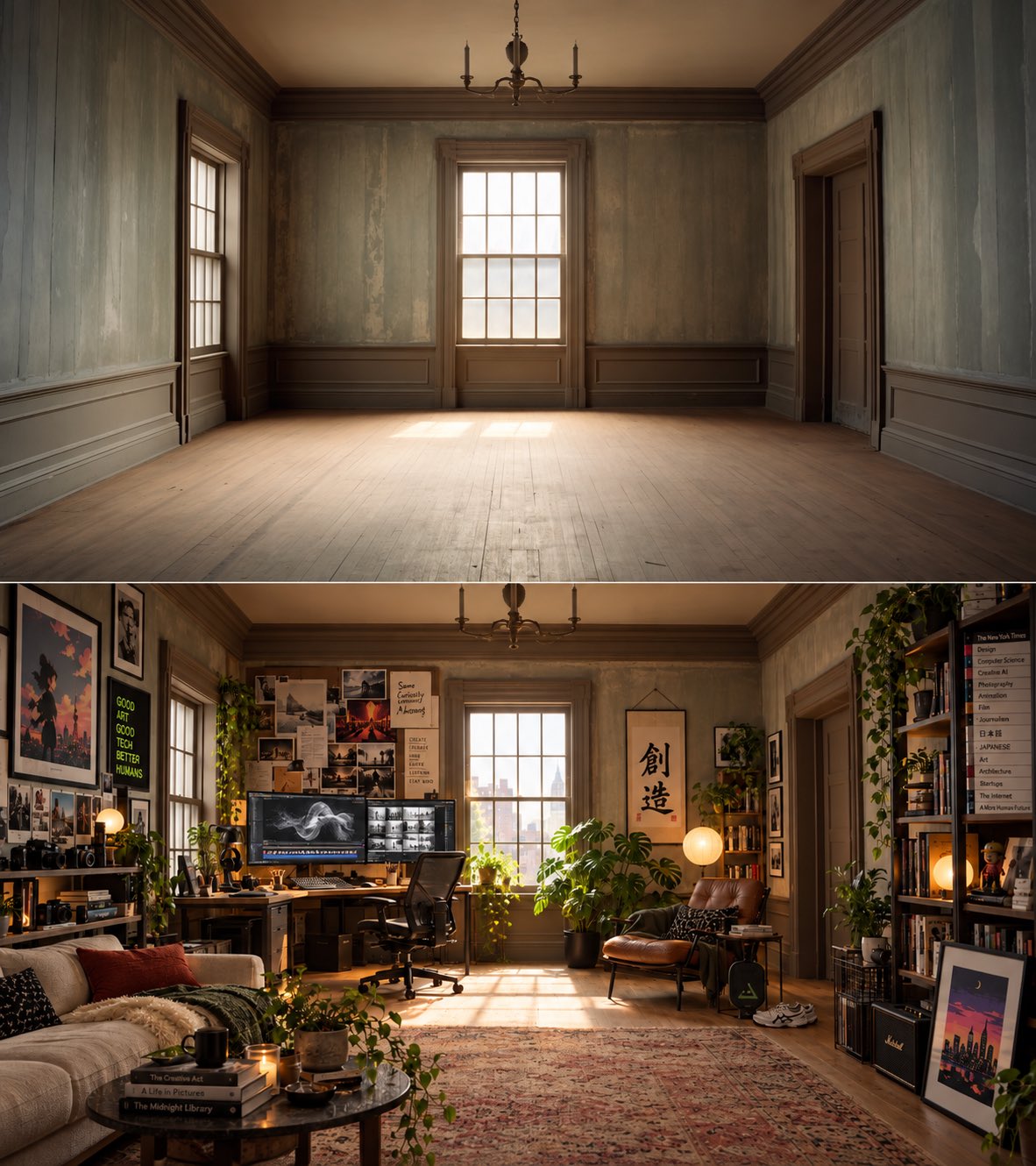
In shortFill This Room is a ChatGPT image prompt, not a dance or a photo-to-video template. You send a photo of an empty room—or just the sentence—and ask the model to furnish the space with everything it knows about you from past chats. The picture that comes back is a self-portrait made of furniture: hobbies, pets, work gear and the odd detail you forgot you ever mentioned. The format started on X on 26 September 2026 (27 September 06:40 Asia/Shanghai), when Kris Kashtanova (@icreatelife) posted an empty room and asked people to fill it from ChatGPT’s memory; a mid-October wave, then Japanese and Spanish write-ups, carried the same one-line prompt further. This page features @icreatelife’s own before-and-after still from that origin post. KickClap cannot generate this effect yet: there is no upload, maker or checkout here.
What Fill This Room is
Fill This Room is a still-image prompt. You give ChatGPT a bare room—often a photo of an unfurnished space, sometimes just the request—and type a line such as “fill this room with everything you know about me.” The model uses what it has stored about you to decorate the room. Bookshelves, instruments, jerseys, pets and desk setups show up as a kind of portrait without a face.
People share the result because it is easy to read at a glance: the empty room is the before, the crowded interior is the after, and the joke is how accurate—or how strangely off—the furniture feels. A popular twist adds “exaggerate” or “go a little over the top,” which turns a tidy render into a cluttered museum of habits. This is a ChatGPT (or similar chatbot) image, not a KickClap video effect.
Where Fill This Room came from
The earliest clear post we can verify is Kris Kashtanova (@icreatelife) on 26 September 2026 at 22:40 UTC (27 September 06:40 Asia/Shanghai): “Ask ChatGPT knowing everything it knows about you to fill this room,” with an empty period room and, in the same still, the furnished result. That before-and-after is the featured image on this page. A later write-up by AI Op Zak also points to this late-September post as the start.
The phrase went wider in mid-October on English-language X. @realdeeben on 13 October 2026 at 21:58 Asia/Shanghai and @raheemotic on 14 October 2026 at 22:33 Asia/Shanghai circulated the now-standard wording, “fill this room with everything you know about me,” often with a photo of a bare room for others to try. On 25 October 2026 at 19:23 Asia/Shanghai, @damnang2 posted a before-and-after with the louder variant, “Go a little over the top!” Japanese coverage followed on 6 November, when hashout.jp (Shiritomo) explained the prompt and ChatGPT’s memory settings; on 8 November, TV Azteca published a Spanish how-to, including “Llena este espacio con todo lo que conoces de mí.” The trend travels as a prompt people copy, not as one dominant video.
Why Fill This Room spread
It is almost no work: one photo and one sentence, and the result is about you. There is no choreography, no template timeline and no editing app to learn. The room is also a softer way to ask what a chatbot has stored than “what do you know about me?”—the answer arrives as a picture you can laugh at, show friends, or feel slightly unsettled by.
That mix of flattering and creepy is the hook. Some people recognize a hobby they talk about all the time; others notice an object tied to a question they asked months ago and had forgotten. Coverage in Japanese and Spanish in early November shows the same prompt being tried in new languages, which is how a modest X thread becomes a searchable trend.
The plain prompt, the over-the-top take, and what this is not
The plain prompt. Attach a photo of an empty room, or skip the photo, and write: “Fill this room with everything you know about me.”
Go over the top. The same request plus “Exaggerate” or “Go a little over the top!” for a crowded, maximal room—the version @damnang2 popularized in late October.
Styled or listed rooms. Some people name a style (cozy, modern) or list a few facts if memory is off or they would rather not use chat history. That still produces a decorated room, but it is no longer a portrait of stored memory.
Not a KickClap maker, and not the official Messi room clip. OpenAI’s ChatGPT account has posted a separate empty-room promo with a different line (“Reimagine this room in my style. Surprise me.”). That is related marketing, not this memory prompt. KickClap has no image generator for Fill This Room on this page, and this page does not embed X or YouTube.
What to get right before you post one
Try this in ChatGPT (or another chatbot with memory and image output), not on KickClap—this page does not accept uploads or generate a room. If you use a photo, prefer a bare, generic interior rather than a shot that shows your real address, family, or papers. After the image comes back, zoom in: names, workplaces, health details and documents should come out before you post. You can ask the model to remove a specific object.
If the room surprises you, treat that as a reason to check memory, not just a caption. In ChatGPT, open Settings, then Personalization, then Memory (or Manage memories) to review or delete stored items, or turn memory off. Temporary chats do not write new memories. Credit the prompt’s originators if you explain the trend, and do not post other people’s information. KickClap cannot generate this effect and does not accept uploads for it here.
Can you make Fill This Room on KickClap?
This page shows a credited still and a source link. KickClap cannot generate this effect yet.
Questions about Fill This Room
What is the Fill This Room trend?
A late-2026 ChatGPT image trend: you ask the model to “fill this room with everything you know about me,” usually with a photo of an empty room, and share the furnished interior it builds from your past chats and saved memories.
What is the exact prompt?
The line that spread is “Fill this room with everything you know about me.” A widely copied variant adds “Go a little over the top!” or “Exaggerate.” TV Azteca’s Spanish wording is “Llena este espacio con todo lo que conoces de mí.”
Why does ChatGPT know what to put in the room?
Because of its Memory feature, which can keep preferences and details from earlier conversations and, depending on your plan and region, other sources you have allowed. If memory is off or the account is new, the room is often generic unless you list facts in the prompt.
How do I see or delete what ChatGPT remembers?
In ChatGPT, go to Settings → Personalization → Memory (Manage memories). You can review or delete individual memories, clear them, or turn memory off. OpenAI documents this in its Memory in ChatGPT help article. Deleting a memory does not automatically delete the original chat.
Who started the Fill This Room trend?
The earliest post we verified is Kris Kashtanova (@icreatelife) on 26 September 2026. Mid-October posts by @raheemotic and others spread the exact “fill this room with everything you know about me” wording; some later articles start the story there and miss the September post.
Do I need a photo of an empty room?
It helps, and most shared examples attach one, but it is not required. You can ask ChatGPT to invent an empty room first, or run the prompt as text only. If you do upload a photo, avoid one of your actual home that reveals an address or private papers.
Can KickClap make a Fill This Room image from my photo?
Not yet. This page is for looking at a credited origin still and understanding the prompt. There is no photo upload, generation or checkout for this effect here.
Sources
- Kris Kashtanova (@icreatelife) on X — origin post and featured before/after still; 2026-09-26 22:40 UTC (2026-09-27 06:40 Asia/Shanghai)
- @realdeeben on X — mid-October prompt post; 2026-10-13 21:58 Asia/Shanghai
- @raheemotic on X — “fill this room with everything you know about me”; 2026-10-14 22:33 Asia/Shanghai
- @damnang2 on X — “Go a little over the top!” before/after; 2026-10-25 19:23 Asia/Shanghai
- AI Op Zak — Empty room trend: what ChatGPT knows about you (17 October 2026; cites @icreatelife)
- hashout.jp (Shiritomo) — Japanese write-up of the prompt and memory settings (6 November 2026)
- TV Azteca — Spanish how-to, including “Llena este espacio con todo lo que conoces de mí” (8 November 2026)
- OpenAI Help Center — Memory in ChatGPT